

SAP IDM transition · 4 min read
What Provisioning to On-Premise S/4HANA Through Entra Really Involves
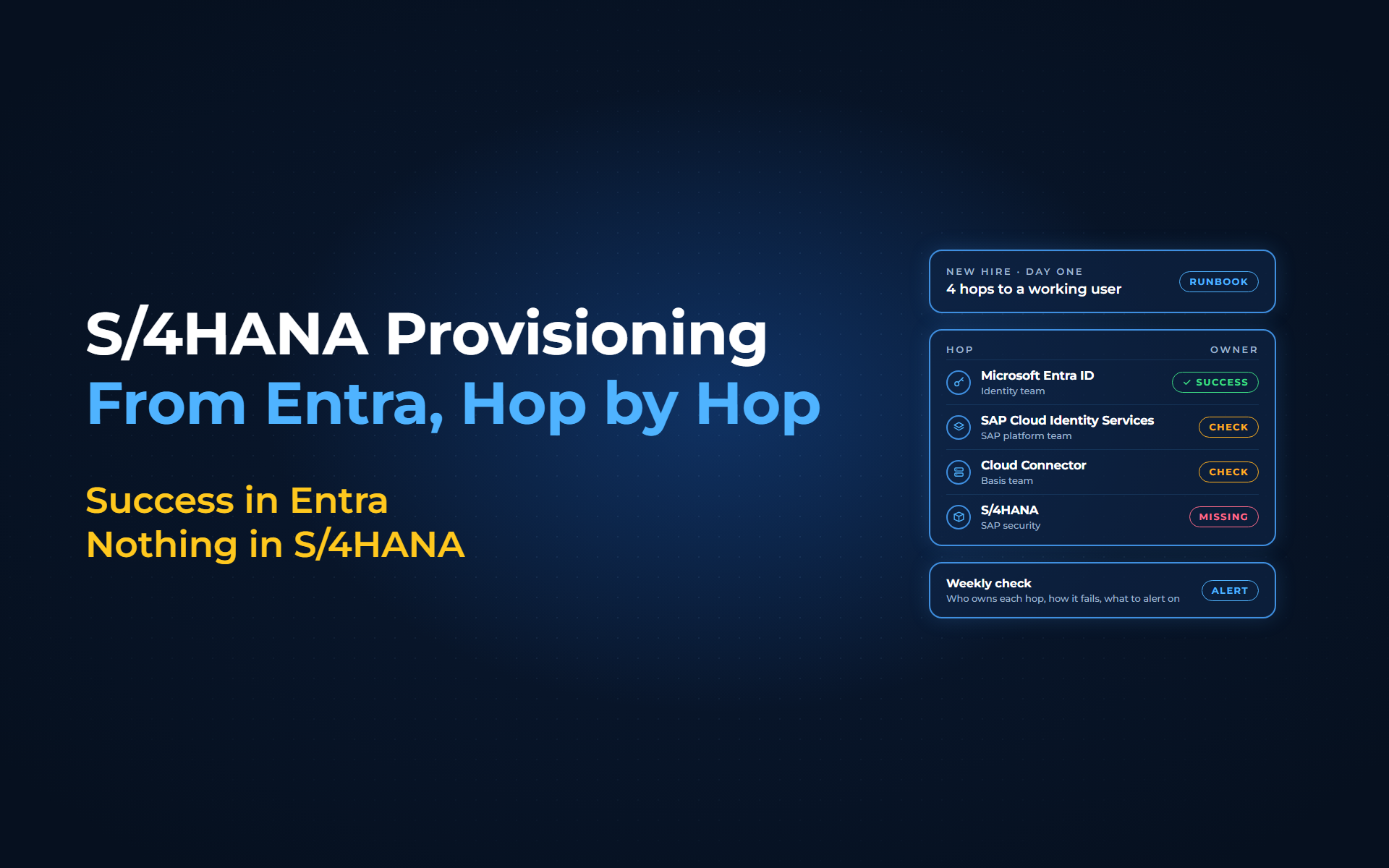
S/4HANA provisioning from Entra to an on-premise system crosses 4 hops: Microsoft Entra ID, SAP Cloud Identity Services, the SAP Cloud Connector and SAP S/4HANA. Each hop has its own owner, its own log and its own way of failing quietly. With Anugal, Entra still provisions; Anugal makes the access decision before the first hop and keeps the record of it.
A new buyer starts on Monday. On Friday, the Entra provisioning log showed her account as Success. On Monday, she cannot log on to S/4HANA. The Entra team sees green, the SAP identity admin has not opened the job log, and Basis has not checked the Cloud Connector. Three teams each own one hop. Nobody owns the path.
On the route Microsoft Learn documents, her Success only proves hop 1. Hop 2 picks her up in SAP Cloud Identity Directory and must still reach S/4HANA through the Cloud Connector.
Who owns each hop, and what should you alert on?
Each hop has its own owner and console, so you set up alerting 4 times.
| Hop | Owner | Typical failure | Where you see it | Alert on |
|---|---|---|---|---|
| 1. Entra provisioning | Entra team | User skipped (not in the app's User role); DuplicateTargetEntries; quarantine | Provisioning page and logs, Entra admin center | Quarantine email; Failure and Skipped events |
| 2. SAP Cloud Identity Services | SAP identity admin | Job finished with error; roles missing because group provisioning is off by default | Identity Provisioning Job Logs, Failed Entities | “Provisioning Finished with Error” notification |
| 3. SAP Cloud Connector | Basis | Tunnel lost; no access control mapping for S/4HANA; expired certificate | Subaccount Dashboard and alerts; SAP BTP cockpit | Tunnel alerts; certificate expiry (default 30 days ahead) |
| 4. SAP S/4HANA | SAP security | SOA Manager services ManageBusinessUserIn or QueryBusinessUserIn missing; business user not linked | Failed entities for the S/4HANA target; SU01 | Failed entities on that target |
Hop 4 also needs release 1809 or higher and a technical user. Identity Provisioning creates the ABAP user with its PFCG roles, then links a business user to it. With HR integration on, the default, it manages only logon data and role assignments.
A new hire shows Success in Entra. Which hop failed?
Usually not hop 1. Success in Entra means SAP Cloud Identity Services accepted the user, not S/4HANA. Match the symptom to the hop:
| Symptom | Likely hop | Check |
|---|---|---|
| Success in Entra, no user in S/4HANA | 2, 3 or 4 | Job log for the S/4HANA target, then the tunnel |
| Skipped in the Entra log | 1 | User role assignment (Default Access is excluded); disabled account (NotEffectivelyEntitled) |
| Changes arrive daily, not about every 40 minutes | 1 | Quarantine: cycles slow to daily; after 4 weeks the job is disabled |
| Job error mentioning a timeout | 3 | Cloud Connector connectivity |
| User in S/4HANA without roles | 2 | Group provisioning in the source transformation |
| Create fails for an existing user | 1 or 4 | DuplicateTargetEntries in Entra; personExternalID match in Identity Provisioning |
What should you monitor weekly for S/4HANA provisioning from Entra?
5 checks, 1 per console plus 1 end to end:
- Entra:
Quarantine status and the week's Failure and Skipped events. Entra keeps audit events for up to 30 days; send them to Azure Monitor to keep longer. - Identity Provisioning:
Jobs that finished with error, and who gets job notifications. By default, a job that keeps failing sends no new email. - Cloud Connector:
Open alerts, expiring certificates and, with a shadow instance, high availability alerts. - S/4HANA:
After maintenance, confirm the technical user and both web services still work. - End to end:
Compare the week's joiners in Entra with new business users in S/4HANA. A gap with no error anywhere is the one that hurts.
Where does Anugal fit beside Entra?
Anugal connects with Entra, and Entra provisions. Anugal adds what the 4 consoles lack: the access decision and one record of it.
| Entra and SAP Cloud Identity Services alone | With Anugal beside Entra | |
|---|---|---|
| Decision | Access package approval or direct app role assignment | Eligibility and risk evaluated at request time; approval routed to the application, data or role owner |
| Record | Entra audit log plus separate SAP job logs | Who approved, under which policy and why, as append-only audit records |
| Audit proof | Exports from 4 consoles | Timestamps, actors, policy references and execution results in one audit trail |
The result Entra reports for each provisioning event is attached to the same record. Anugal maintains pre-built connectors for SAP, so S/4HANA can also be connected directly, without the extra hops.
With Anugal, Microsoft Entra ID still runs provisioning toward SAP S/4HANA, while Anugal makes the access decision before the first hop and records who approved it, under which policy and why.
Entra plus SAP Cloud Identity Services may be all you need. If few people use S/4HANA, Entra access packages carry your approvals and your teams already run the weekly checks, add monitoring, not another product. Still choosing a route? Start with your SAP IDM options. You still own the 4 hops, their alerts and S/4HANA role design.
See Anugal beside Entra
From a green tick in Entra to a user who can log on
Success in Entra ends hop 1, not the path. Name an owner, an alert and a weekly check per hop, and keep the decision in one place. To watch a joiner's approval recorded before hop 1 runs, let's get you a working demo, or write to info.anugal@businesscoresolutions.com.
S/4HANA provisioning from Entra: common questions
Why does Entra show Success when the user never reaches S/4HANA?
Because the Entra log covers hop 1 only. Success there means SAP Cloud Identity Services accepted the account. Whether S/4HANA got it is recorded elsewhere: in the Identity Provisioning job log, where failed entities for the S/4HANA target are listed.
How often does Entra provision users to SAP Cloud Identity Services?
After the initial cycle, about every 40 minutes while the provisioning service runs. If the job goes into quarantine, cycles are gradually reduced to once a day, and a job left in quarantine for more than 4 weeks is disabled.
What does on-premise S/4HANA need before Identity Provisioning can create users?
Release 1809 or higher, a technical user, the SAP Cloud Connector with an access control mapping for the system, and SOA Manager set up for the ManageBusinessUserIn and QueryBusinessUserIn web services.
Sources
- Microsoft Learn: Manage access to your SAP applications (https://learn.microsoft.com/en-us/entra/id-governance/sap). ms.date 29 Jan 2024; page updated 9 Apr 2026. Route for on-premise S/4HANA: Entra to SAP Cloud Identity Directory, then SAP Cloud Identity Services to S/4HANA through the SAP Cloud Connector.
- Microsoft Learn: Configure SAP Cloud Identity Services for automatic user provisioning with Microsoft Entra ID (https://learn.microsoft.com/en-us/entra/identity/saas-apps/sap-cloud-platform-identity-authentication-provisioning-tutorial). ms.date 20 Apr 2026. Only users assigned to the User role are provisioned (Default Access excluded); syncs about every 40 minutes; DuplicateTargetEntries and NotEffectivelyEntitled; quarantine notification email.
- Microsoft Learn: Plan deploying Microsoft Entra for user provisioning with SAP source and target apps (https://learn.microsoft.com/en-us/entra/identity/app-provisioning/plan-sap-user-source-and-target). ms.date 4 Mar 2025; page updated 27 Mar 2026. Check provisioning logs filtered to Failure; Entra stores audit events for up to 30 days; Azure Monitor for longer retention.
- Microsoft Learn: Application provisioning in quarantine status (https://learn.microsoft.com/en-us/entra/identity/app-provisioning/application-provisioning-quarantine-status). ms.date 4 Mar 2025. Quarantine reduces incremental cycles to once per day; a job in quarantine for more than four weeks is disabled; invalid credentials and failure thresholds.
- Microsoft Learn: Provisioning logs in Microsoft Entra ID (https://learn.microsoft.com/en-us/entra/identity/monitoring-health/concept-provisioning-logs). ms.date 17 Mar 2025. Status values Success, Failure, Skipped and Warning.
- SAP Help, SAP Cloud Identity Services: SAP S/4HANA On-Premise (target system) (https://help.sap.com/docs/IDENTITY_AUTHENTICATION/6d6d63354d1242d185ab4830fc04feb1/fd6de3ccee3e4ca09ed49b6c7d8c0042.html). Release 1809 or higher; Cloud Connector with access control mapping; technical user; SOA Manager services ManageBusinessUserIn and QueryBusinessUserIn; ABAP user with PFCG roles, then business user linked; HR integration default.
- SAP Help, SAP Cloud Identity Services: Monitor Provisioning Job Logs (https://help.sap.com/docs/IDENTITY_AUTHENTICATION/6d6d63354d1242d185ab4830fc04feb1/e5b5176c17ae4ae4bd32ae07877ddd79.html). Job Logs; statuses Success, Finished with Error, Running with Error.
- SAP Help, SAP Cloud Identity Services: Job and Transformation Issues (https://help.sap.com/docs/IDENTITY_AUTHENTICATION/6d6d63354d1242d185ab4830fc04feb1/dbe3c08ebe7c47fb98422680c6580cc0.html). Group provisioning is ignored by default in source transformations; timeout exceptions from connectivity issues.
- SAP Help, Identity Provisioning: Manage Job Notifications (https://help.sap.com/docs/IDENTITY_PROVISIONING/f48e822d6d484fa5ade7dda78b64d9f5/d055bc278e614713916090c532e3859f.html). Provisioning Finished with Error emails; by default no further email while the same job keeps failing.
- SAP Help, SAP BTP Connectivity: Cloud Connector Monitoring (https://help.sap.com/docs/CP_CONNECTIVITY/b865ed651e414196b39f8922db2122c7/6d9c937dd35344bca3eb61ebf34a5c1d.html). Subaccount Dashboard shows connection state; Connectivity view in the SAP BTP cockpit.
- SAP Help, SAP BTP Connectivity: Cloud Connector Alerting (https://help.sap.com/docs/CP_CONNECTIVITY/cca91383641e40ffbe03bdc78f00f681/87bffd934192418bbb866aedd1442ad8.html). Alerts for tunnels and service channels, high availability and certificate expiry (default 30 days).
- Anugal: Approval and Access Control Engine (https://anugal.ai/approval-access-control-engine/). Evaluates eligibility, SoD and risk at request time; routes approvals to application, data or role owners; captures who approved, under which policy and why.
- Anugal: Reports and Audit Trails (https://anugal.ai/reports-audit-trails/). Append-only audit records; evidence retains timestamps, actors, policy references and execution results.