

SAP IDM 2027 · 6 min read
How to Decommission SAP IDM Without Losing Your Audit Trail
SAP IDM decommissioning should retire the software, not the evidence. Before switch-off, decide which access history you keep, archive or migrate, and who signs off on that decision. With Anugal, current identity data migrates, SAP IDM history moves into a read-only, searchable archive, and every approval, certification and SoD decision made in Anugal after cutover lands in an append-only audit record.
Picture an audit in 2029, a year after SAP IDM went offline. The auditor samples a business role granted in 2025 and asks who approved it, and why. Your new platform's records begin on cutover day. The answer sits in an SAP IDM database backup that nobody can still restore and query by user and date.
SAP has stated that mainstream maintenance for SAP Identity Management 8.0 ends at the end of 2027, with extended maintenance available until 2030. Audit questions about access granted under SAP IDM outlast both dates.
What audit evidence lives in SAP IDM?
SAP IDM holds years of access history. SAP's own support articles for version 8.0 cover detailed assignment history and audit information, the reason an approver enters when approving or declining, and, when enabled, an extended audit log saved in the table mxp_ext_audit. Together, those records answer what auditors sample: who received which business role or privilege, when, who approved it and why.
That evidence lives in SAP IDM's own database. After switch-off, it is only as useful as the archive you planned for it, so first check which approvals ran through SAP IDM rather than SAP GRC or a ticketing tool, and whether housekeeping jobs have already purged older audit entries.
Why does SAP IDM decommissioning put the audit trail at risk?
SAP IDM audit trails get lost through timing and ownership gaps:
- Nobody owns the evidence:
The migration team owns cutover and compliance owns retention policy, so SAP IDM history falls between them. Our SAP IDM migration guide asks "which audit evidence must remain available after cutover". - The history is tied to the system:
A backup keeps the data, but an auditor needs one user's history by date, readable without SAP IDM running. - Retention gets decided too late:
Our SAP IDM end-of-life guide warns against leaving audit evidence for cutover weekend. - Keeping everything is not safe either:
Identity history is personal data. GDPR Article 5(1)(e) requires personal data to be "kept in a form which permits identification of data subjects for no longer than is necessary for the purposes for which the personal data are processed".
Decommission the system, not the proof.
Keep, archive or migrate: what happens to each record?
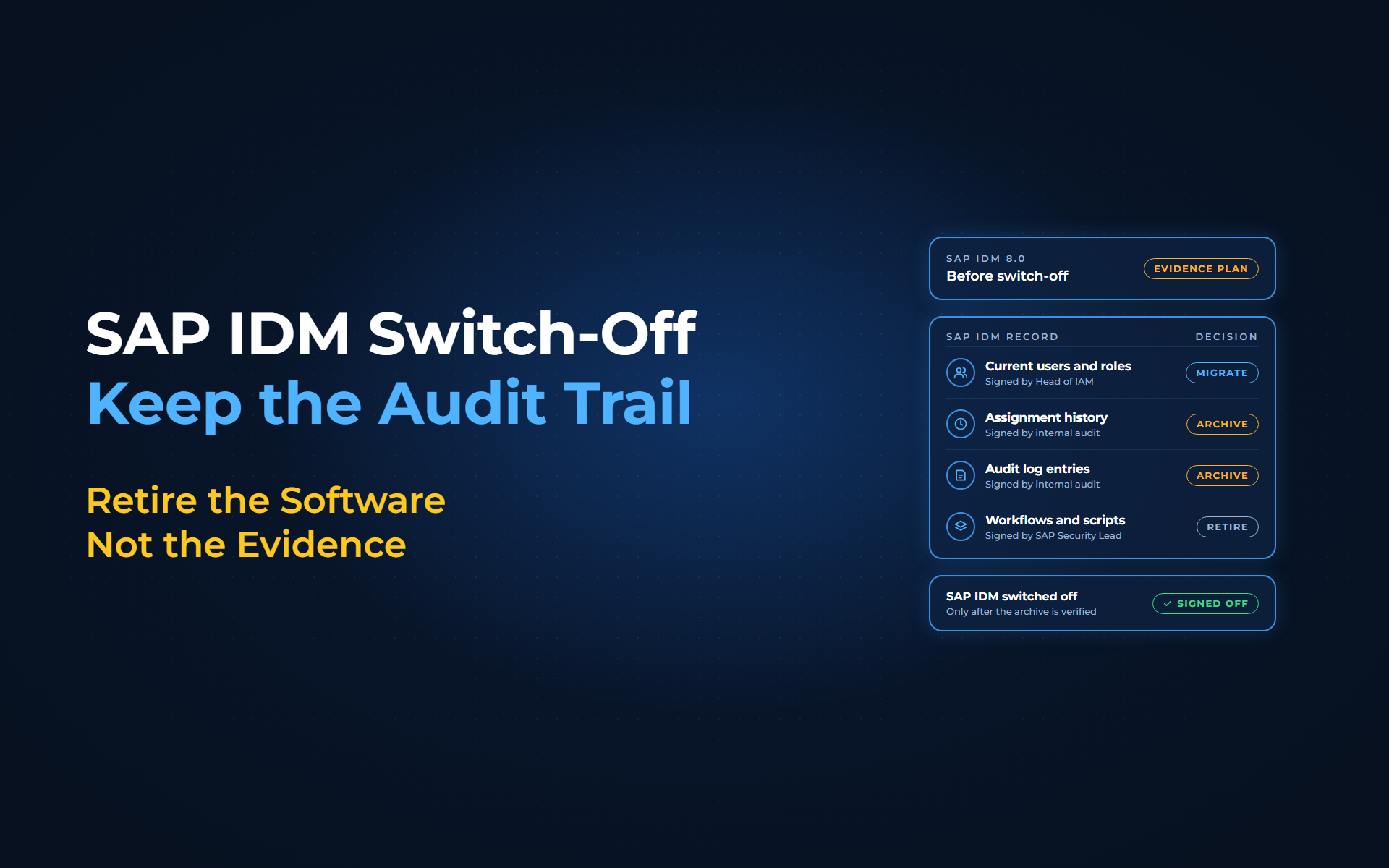
Classify SAP IDM evidence the way you classify its capabilities, and review the result with internal audit:
| Record | Decision | Why | Who signs |
|---|---|---|---|
| Current users, roles, assignments and entitlements | Migrate | The new platform starts from today's access, not a blank sheet | Head of IAM |
| Assignment history and approval reasons | Archive in a searchable form | Auditors sample past grants by user and date | Head of IAM, reviewed by internal audit |
| Audit log entries, including the extended audit log if enabled | Archive with the history | Shows what changed and when | Head of IAM, reviewed by internal audit |
| Workflow, script and connector definitions | Document, rebuild what is needed, retire | Explains how past decisions were made | IAM platform owner |
Identity data retention for each archived record comes from your regulator, your sector and your own policy. Set each period with legal and your data protection officer, then review it with internal audit before the first migration wave.
How Anugal keeps one evidence trail across the cutover
With Anugal, evidence is part of the migration plan from the start:
- Decide on evidence early:
Our SAP IDM migration starts with discovery and ends with archive and retire. Use discovery to give each record type in the table a decision and an owner. - Start from your own data:
Anugal's migration service carries identity master data out of SAP IDM, so users, roles, assignments and entitlements land in the new platform. - Prove continuity in parallel:
Where continuity needs it, both systems run in parallel until outputs match, so you can show where the new trail picks up. - Record every decision from day 1:
Each lifecycle event, approval, certification and SoD decision made in Anugal becomes an append-only audit record with timestamps, actors, policy references and execution results, which helps support audit-ready evidence. - Retire on sign-off:
Cutover completes only after continuity is proven, residual dependencies are addressed and the new governance model is operating as intended. SAP IDM is switched off only after the archive is verified and the record owners from the table sign off. Then lock or remove the technical users and connector credentials SAP IDM used to provision your target systems.
You keep the retention decision. Before SAP IDM is retired, Anugal's archive stage moves provisioning history, approval trails, audit logs and identity records into a read-only archive you can search by user, role, system or date. Where SAP GRC stays in place, Anugal coexists with it.
See an SAP IDM cutover end to end
From a switched-off system to an audit trail you can search
Map what SAP IDM records, agree on retention with audit, and switch off only once the new trail has picked up the story. To see how Anugal carries evidence across an SAP IDM cutover, let's get you a working demo, or write to info.anugal@businesscoresolutions.com.
SAP IDM decommissioning: common questions
What is SAP IDM decommissioning?
SAP IDM decommissioning is the final step of a migration, when the SAP IDM servers are switched off and the technical users SAP IDM used in connected systems are locked or removed. Complete it only after continuity is proven, residual dependencies are addressed and the record owners have signed off on what happens to the evidence SAP IDM holds.
Is a database backup of SAP IDM enough for auditors?
Usually not on its own. A backup keeps the data, but auditors sample one user's history by date and expect to read it without SAP IDM running. Archive assignment history, approval reasons and audit log entries in a searchable form instead.
How long must we keep SAP IDM audit data?
There is no single period. Identity data retention depends on your regulator, your sector and your own policy, and GDPR limits how long personal data is kept. Set each period with legal and your data protection officer, then review it with internal audit before the first migration wave.
Which SAP IDM data should move to the new platform?
Current users, roles, assignments and entitlements usually migrate, so the new platform starts from today's access. Assignment history, approval reasons and audit log entries are usually archived in a searchable form, and workflow and script logic is documented, rebuilt where still needed, then retired.
How does Anugal keep the audit trail intact after SAP IDM is switched off?
Before switch-off, Anugal moves SAP IDM history into a read-only, searchable archive. It migrates current identity data, can run in parallel with SAP IDM where continuity needs it, until outputs match, and records every lifecycle event, approval, certification and SoD decision made in Anugal after cutover as an append-only audit record with timestamps, actors and policy references.
Sources
- Anugal: SAP IDM Migration (https://anugal.ai/sap-idm-migration-to-anugal/). Six stages: discover, design, migrate, verify and go live, archive, retire; provisioning history, request and approval trails, audit logs and identity records move into a read-only, searchable archive; SAP IDM is decommissioned only after the archive is verified and you sign off.
- Anugal: SAP IDM End of Life 2027: Replacement & Migration Guide (https://anugal.ai/sap-idm-end-of-life-2/). SAP IDM 8.0 mainstream maintenance to the end of 2027 and extended maintenance to 2030, as stated by SAP; the item "which audit evidence must remain available after cutover"; the Anugal migration path (discover, classify, design, migrate, validate, cut over, govern); retire SAP IDM only after continuity is proven, residual dependencies are addressed and the new governance model is operating as intended.
- Anugal: SAP IDM End of Life 2027: What It Means and Why to Act Now (https://anugal.ai/sap-idm-end-of-life/). Anugal's migration service carries identity master data (users, roles, assignments, entitlements) out of SAP IDM; both systems run in parallel until outputs match; the mistake of leaving audit evidence for cutover weekend.
- SAP KBA 2094270: How to get assignment history/audit information (https://userapps.support.sap.com/sap/support/knowledge/en/2094270). SAP Identity Management 8.0 holds detailed assignment history and audit information.
- SAP KBA 2754559: IDM - Locating Approval Reason (https://userapps.support.sap.com/sap/support/knowledge/en/2754559). In SAP Identity Management 8.0, approvers enter a reason in the "Approval Reason" pop-up when they approve or decline.
- SAP KBA 2432115: How to enable extended audit log (https://userapps.support.sap.com/sap/support/knowledge/en/2432115). The SAP Identity Management 8.0 extended audit log is saved in the table mxp_ext_audit.
- Regulation (EU) 2016/679 (GDPR), Publications Office of the EU (https://publications.europa.eu/resource/celex/32016R0679). Article 5(1)(e), storage limitation, quoted verbatim.
- Anugal: Reports & Audit Trails (https://anugal.ai/reports-audit-trails/). Lifecycle events, approvals, certifications and SoD decisions recorded as append-only audit records with timestamps, actors, policy references and execution results; certifications linked to access state at review time.
- Anugal: FAQs (https://anugal.ai/faqs/). Anugal coexists with current tools such as SAP GRC.