

DORA for SAP teams · 6 min read
How to Prove Who Had SAP Access When a DORA Incident Happened
DORA incident access evidence shows who held access to an affected system when an incident happened, who approved it and when it ended. SAP shows today's access well, but root-cause work needs the access that existed on the day. With Anugal, every grant, approval and removal made through it is kept as a timestamped, append-only record.
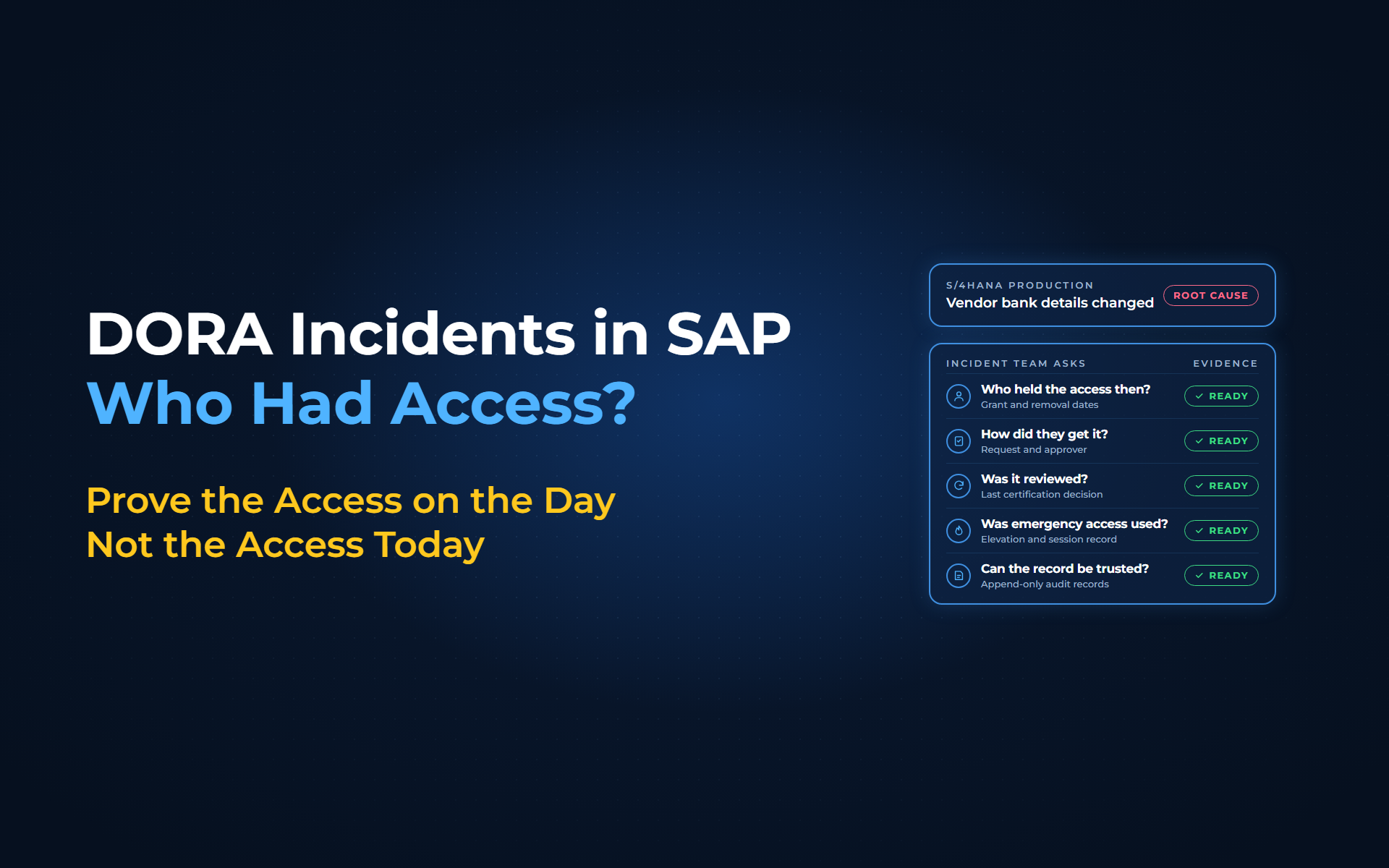
Treasury flags a supplier payment that went to a bank account nobody recognizes. Change documents show the bank details were changed 3 weeks earlier in S/4HANA production, under an unfamiliar user ID. The incident lead asks the SAP Security Lead: who could make that change that day, and who approved their access? This morning's user report lists who holds the role now. Two of them received it last week. The contractor who held it on the day left at month end and is not on the list.
What does DORA ask for after an ICT incident?
DORA asks you to find and document the root cause of every ICT-related incident, and access is often part of it. Article 17(2) of Regulation (EU) 2022/2554 requires procedures that ensure:
"root causes are identified, documented and addressed in order to prevent the occurrence of such incidents"
For a major ICT-related incident, the final report follows once "the root cause analysis has been completed" (Article 19(4)(c)), and Delegated Regulation (EU) 2025/301 requires it to contain "information about the root causes".
Access can also decide the classification. Under Delegated Regulation (EU) 2024/1772, an incident that affects critical services and involves "successful, malicious and unauthorised access" that may result in data losses is a major incident. You cannot call access unauthorized until you know what was authorized at that moment. Delegated Regulation (EU) 2024/1774 adds the groundwork: log access control and identity management events (Article 12) and "retain all evidence relating to ICT-related incidents" for a period matched to the criticality of the affected functions (Article 22).
Why today's access report is the wrong answer
A current-state report describes the system after the incident:
- Access has changed:
Roles were added and removed, users left, and the response team may have locked accounts in the first hours. - SAP history is usually read one system at a time:
SAP change documents, read through transaction SUIM, show changes to users and role assignments and can be filtered by who made them, but they do not carry the request, the approver or the reason. - The approval lives elsewhere:
Tickets, emails and GRC requests sit in other tools, so matching a role to its approval becomes manual work under time pressure. - Evidence gathered afterward is easy to question:
Delegated Regulation (EU) 2024/1774 requires measures to protect logs against tampering and deletion. A spreadsheet assembled after the incident is not that.
What should DORA incident access evidence show?
Point-in-time access evidence answers 5 questions for each identity that could reach the affected system on the day:
| Incident team asks | Evidence needed | With Anugal |
|---|---|---|
| Who held the access then? | Grant and removal dates per user, role and system | Timestamped record of role changes and lifecycle events |
| How did they get it? | Request, approver and policy checks | Approval and policy evaluation stored with each request |
| Was it reviewed? | Last certification decision and rationale | Certifications linked to the access state at review time |
| Was emergency access used? | Who was elevated, for how long, doing what | Time-bound elevation, recorded sessions, proof of removal |
| Can the record be trusted? | Records protected against later edits | Append-only audit records with actors and timestamps |
How Anugal keeps SAP access history ready
With Anugal, access history is recorded as access changes:
- Capture access events at source:
Requests, approvals, role changes, lifecycle events, certifications and SoD decisions are recorded with user, system, entitlement and request context, across SAP and non-SAP systems. - Keep the why next to the what:
Each request is checked against policy, approval rules and SoD controls, with the decision and rationale stored alongside. - Make the record tamper-resistant:
Decisions, actions and outcomes are kept as append-only audit trails with timestamps, actors and policy references. - Prove removals as well as grants:
Leaver access is revoked in connected systems, and Anugal flags access drift and failed deprovisioning. - Bring firefighter access into the same trail:
Emergency access run through Anugal is approved, time-bound and recorded during use, with a post-use review and proof of closure. - Answer on the day it is asked:
For any date after a system was connected, your team pulls its SAP access history from Anugal's reports and audit views instead of rebuilding it from exports.
Anugal coexists with SAP GRC; where GRC firefighter stays in place, its logs remain the record for those sessions. Anugal records the access side, which helps support audit-ready evidence. Outside Anugal-run firefighter sessions, in-transaction activity and role content history still come from SAP change documents, the Security Audit Log and your security monitoring. You still own the classification and the report to your competent authority.
From today's access list to the access that existed on the day
Record every grant, approval and removal that runs through Anugal as it happens, keep it in an append-only trail, and your DORA incident access evidence becomes a report instead of a reconstruction. To see that access history for your own SAP systems, let's get you a working demo, or write to info.anugal@businesscoresolutions.com.
DORA incident access evidence: common questions
What is DORA incident access evidence?
It is the record of who held access to an affected system or data when an ICT-related incident happened, how they got it, who approved it and when it ended. Incident teams use it to find root causes and to judge whether access was authorized.
Does DORA require you to prove who had access during an incident?
Not in those words. DORA requires root causes to be identified and documented, and the final report on a major incident must contain information about them. The ICT risk management RTS also requires logging of access control events and retention of incident evidence.
When does unauthorized access make a DORA incident major?
Under Delegated Regulation (EU) 2024/1772, an incident that affects critical services and involves successful, malicious and unauthorized access to network and information systems that may result in data losses is a major incident.
Are SAP change documents enough to show who had access?
SAP change documents, read through SUIM, show changes to users and role assignments and can be filtered by who made them. They do not carry the request, the approver or the reason, and they are usually read one system at a time.
How long should incident access evidence be kept?
DORA's ICT risk management RTS asks you to retain incident evidence no longer than necessary and in line with the criticality of the affected business functions and any retention rule in Union law. You set the period within those limits.
Sources
- Regulation (EU) 2022/2554 (DORA), Publications Office of the EU (https://publications.europa.eu/resource/celex/32022R2554). Article 17(2) root causes identified, documented and addressed; Article 19(1) major incidents reported to the relevant competent authority; Article 19(4)(c) final report when the root cause analysis has been completed.
- Commission Delegated Regulation (EU) 2024/1772 (RTS on classification of ICT-related incidents), Publications Office of the EU (https://publications.europa.eu/resource/celex/32024R1772). Article 6(c) unauthorized access as a critical-services criterion; Article 8(1)(a) and Article 9(5)(b) major incident where malicious, unauthorized access may result in data losses.
- Commission Delegated Regulation (EU) 2025/301 (RTS on content and time limits of major incident reports), Publications Office of the EU (https://publications.europa.eu/resource/celex/32025R0301). Article 4(a) final reports contain information about the root causes.
- Commission Delegated Regulation (EU) 2024/1774 (RTS on ICT risk management), Publications Office of the EU (https://publications.europa.eu/resource/celex/32024R1774). Article 12(2)(c)(i) and (d) logging of access control and identity management events and protection of logs; Article 22(d) retention of incident evidence.
- SAP Help (older release): Determining Change Documents (https://help.sap.com/saphelp_snc70/helpdata/en/90/c3e45b841f214ca32fcc17f7eb059e/content.htm). SUIM change documents for users and role assignments, filterable by who made the change.
- SAP Help: The Design of the Security Audit Log (https://help.sap.com/SAPHELP_SCM700_EHP02/helpdata/EN/4d/41bf80aa601c86e10000000a42189b/content.htm). Security-related activities, such as transaction starts, recorded in daily audit files per application server.
- Anugal: Reports and Audit Trails (https://anugal.ai/reports-audit-trails/). Event capture at source, policy and approval context, append-only audit records, certifications linked to access state at review time, reports for investigations.
- Anugal: Insights (Compliance and Security) (https://anugal.ai/insights-compliance-security/). Detection of access drift and failed deprovisioning.
- Anugal: Emergency Access (Firefighter) (https://anugal.ai/emergency-access-firefighter/). Approved, time-bound elevation, session recording, post-use review, proof of closure, leaver access revocation.
- Anugal: FAQs (https://anugal.ai/faqs/). Anugal coexists with current tools such as SAP GRC.