

SAP GRC evaluation · 6 min read
5 Processes to Test When You Evaluate SAP GRC Alternatives
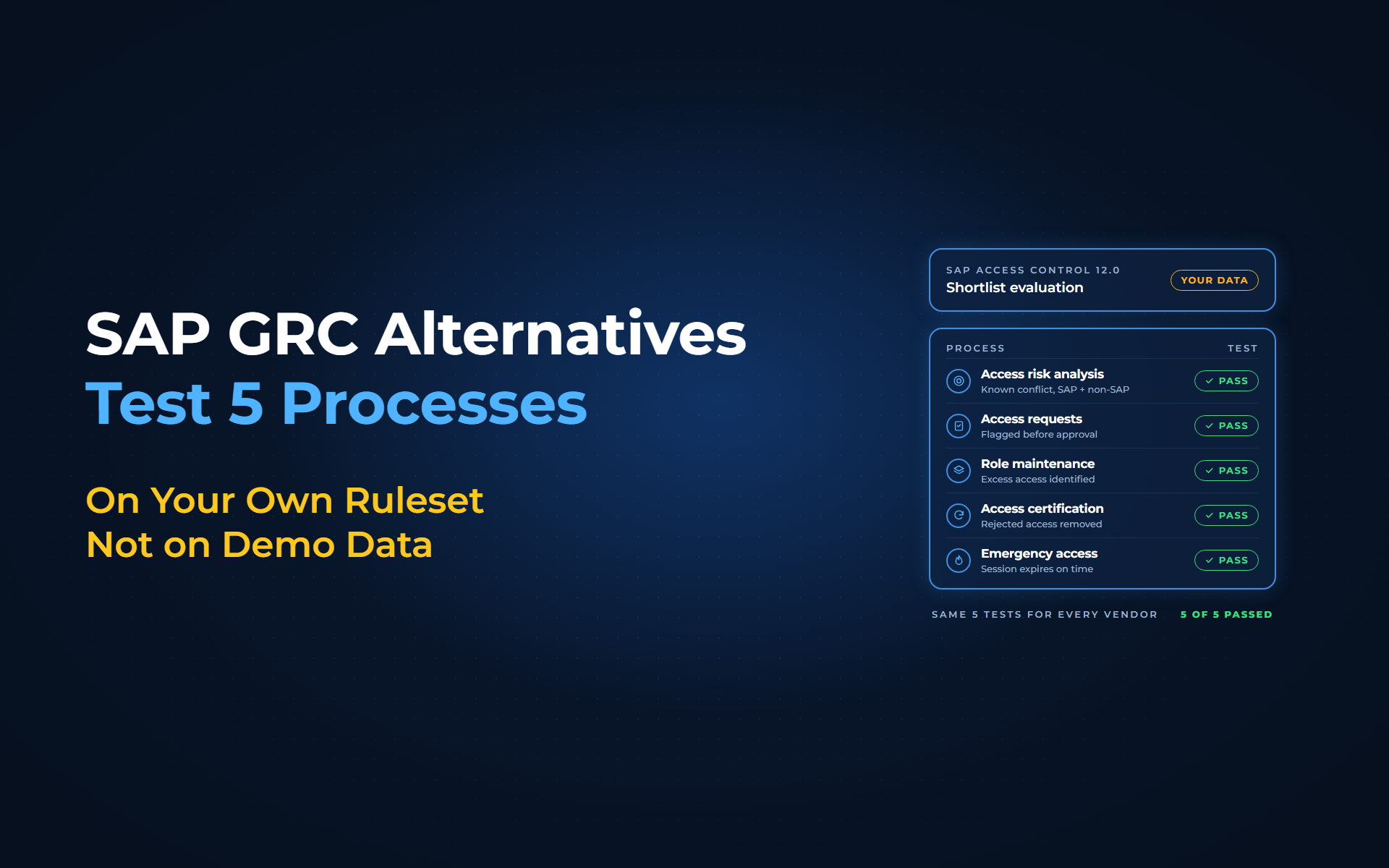
A reliable way to evaluate SAP GRC alternatives is to test the 5 processes SAP Access Control runs for you today, on your own ruleset and users rather than a vendor's demo data. With Anugal, each test runs beside SAP GRC, so you see real results before you change anything.
The shortlist demo went well: clean dashboards and a tidy SoD report. Then your SAP security lead asks the question that matters. Will it catch the conflict our auditors found last year, in our system, with our roles? A feature checklist cannot answer that. A test can.
Why do feature checklists fail as a GRC evaluation?
Mainstream maintenance for SAP Access Control 12.0 ends on 31 December 2027, with extended maintenance announced to 2030, so many teams are weighing SAP's successor, SAP GRC for SAP HANA, against SAP GRC alternatives now. Most start with a feature matrix, and it hides the differences that matter:
- Every row says yes:
Every product ticks "SoD analysis" and "access reviews". - Demo data hides your complexity:
A vendor ruleset on sample users never meets your custom roles, mitigating controls and long-standing exceptions. - SAP-only scope:
Many conflicts span SAP and non-SAP applications, and an SAP-only test misses them. - No evidence check:
Teams judge the screen, not the record an auditor will ask for afterward.
How should you test each SAP GRC process?
SAP's Access Control user guide splits the product into 5 capability areas, and each heading below carries the SAP name in brackets. For every area, bring a case from your own systems and run it in a non-production client refreshed from production, not a scripted demo.
1. Access risk analysis (Analyze Risk)
The test:
Load a copy of your ruleset and pick a known conflict, such as a user who can create a vendor and approve the payment to it. Then add a user who has the transactions but not the authorization values, who should not be flagged, and one non-SAP application.
With Anugal:
A configurable SoD risk library evaluates conflicts across applications, not only inside SAP, and the embedded SAP GRC sync imports your existing ruleset, so you can work from it, from Anugal's own ruleset, or from both once the differences between the two rulesets are reconciled.
2. Access requests (Manage Access)
The test:
Request one role that creates the conflict only in combination with the user's existing access, then ask for an exception.
With Anugal:
Eligibility, SoD and risk checks run before the request reaches an approver. High-risk combinations are blocked, routed for mitigation or escalated by policy, and any mitigation is documented, time-bound and traceable.
3. Role maintenance (Maintain Role)
The test:
Take one overgrown master role with derived roles and ask the platform what no longer belongs in it, using a full year of usage so year-end tasks count. Then check the change for SoD before it is transported.
With Anugal:
Role mining works from real access patterns, rationalization flags overlapping roles and entitlements that no longer fit, and role changes are evaluated against your SoD policies before approval.
4. Access certification (Certify Authorizations)
The test:
Run a pilot campaign on one SAP system, check that the review population matches the role assignments in SAP, and reject at least 1 item.
With Anugal:
Reviews go to the right owners with privileged, dormant and high-risk access highlighted and SoD conflicts flagged. Every decision needs a justification, and rejected access is revoked automatically in connected target systems, with the reviewer, decision and timestamp recorded.
5. Emergency access (Monitor Privileges)
The test:
Check out a firefighter session for a mock incident and let it run past its approved window.
With Anugal:
Emergency access is approved, scoped to specific systems or roles and expires automatically after the approved duration. Sessions and the actions taken in them are recorded, and a mandatory post-use review of the recorded actions closes out each session, with proof that access was removed.
A scorecard for your shortlist
Run the same 5 tests for every vendor and score only what you see.
| Process | Your test case | Pass when |
|---|---|---|
| Access risk analysis | Known conflict, 1 near-miss user, 1 non-SAP app | Conflict found at permission level and matches SAP GRC; near-miss user not flagged; non-SAP leg flagged |
| Access requests | Request that creates the conflict | Flagged before approval; exception carries a mitigating control with an owner, a monitor and an end date |
| Role maintenance | 1 overgrown role | Unused access identified from a year of usage; change checked for SoD, including derived roles, before transport |
| Access certification | Pilot campaign, 1 rejection | Population matches SAP; risk shown to reviewer; removal verified in SAP and still gone after the next sync; decision recorded |
| Emergency access | Mock firefighter session | Expires on time; actions logged; reviewed against the stated reason by someone other than the firefighter |
Anugal coexists with SAP GRC, so all 5 tests can run while SAP GRC stays live and unchanged. If staying with SAP fits your estate better, the tests will show that too. You still own the ruleset, the mitigations and the final decision.
Run the 5 tests on your own data
From a feature checklist to 5 tests you can prove
Run the 5 processes on your own ruleset, score what you see, and choose on evidence. To run these tests on your data, let's get you a working demo, or write to info.anugal@businesscoresolutions.com.
SAP GRC alternatives: common questions
What should you test when evaluating SAP GRC alternatives?
Test the 5 capability areas SAP Access Control covers: access risk analysis, access requests, role maintenance, access certification and emergency access. Run each test on your own ruleset and users, not on a vendor's demo data.
When does SAP Access Control 12.0 mainstream maintenance end?
SAP ends mainstream maintenance for Access Control 12.0 on 31 December 2027 and has announced extended maintenance until 2030, on terms that vary by contract. The software keeps running after that, but many teams are using the time to compare their options.
Why is a demo not enough to choose a GRC replacement?
A demo runs on sample users and a vendor's ruleset. It never meets your custom roles, mitigating controls or exceptions, so it cannot show how the product behaves on the conflicts your auditors find.
Can an SAP GRC alternative run beside SAP GRC during evaluation?
Yes. Anugal coexists with SAP GRC, and its embedded SAP GRC sync imports your existing ruleset, so you can run the tests while SAP GRC stays live and unchanged.
How do you test firefighter access in a GRC evaluation?
Check out an emergency session for a mock incident. A good platform approves and scopes the access, expires it automatically, records the actions taken and closes the session with a post-use review and proof that access was removed.
Sources
- SAP Access Control 12.0 SP27 User Guide, SAP Help Portal (https://help.sap.com/doc/ca8a8544445e47f5bb0cbc8220ae01b2/12.0.27/en-US/loio8bdd50b2b1f34e049c45ded84788789c_EN.pdf). Key Capabilities: the 5 capability areas Analyze Risk, Manage Access, Maintain Role, Certify Authorizations and Monitor Privileges (including Manage emergency access).
- Anugal: SAP IDM End of Life 2027: What It Means and Why to Act Now (https://anugal.ai/sap-idm-end-of-life/). SAP Access Control 12.0: mainstream maintenance ends 31 December 2027, with extended maintenance to 2030.
- Turnkey Consulting: When is the right time to migrate from SAP GRC 12.0? (https://www.turnkeyconsulting.com/resources/blog/when-to-migrate-from-sap-grc-12.0). Mainstream maintenance for SAP GRC 12.0 ends on 31 December 2027; SAP has indicated extended maintenance will run through 2030; extended maintenance is not automatic and its terms vary by contract.
- ERP Today: SAP GRC for SAP HANA Update Signals Real-Time Processing Shift and 2027 Transition Timeline (https://erp.today/sap-grc-hana-update-real-time-processing-2027-transition/). Mainstream maintenance for GRC 12.0 ends in 2027; SAP GRC for SAP HANA succeeds SAP Access Control.
- Anugal: Identity Governance or SAP Threat Detection? Choosing the Right Layer (https://anugal.ai/sap-security-layers-iga-vs-threat-detection/). The approve-a-payment-and-create-the-vendor conflict used as the example test case.
- Anugal: Enforce Segregation of Duties (SoD) product page (https://anugal.ai/enforce-segregation-of-duties-sod/). Configurable SoD risk library across applications; blocked, mitigated or escalated combinations; time-bound, traceable mitigations; access requests and role changes evaluated against SoD policies before approval.
- Anugal: Simplify Access Requests and Approvals product page (https://anugal.ai/simplify-access-requests-approvals/). Eligibility, SoD and risk checks enforced before a request reaches an approver.
- Anugal: Role Design and Optimization product page (https://anugal.ai/role-design-optimization/). Role mining from real access patterns; rationalization that identifies overlapping roles and entitlements that no longer belong.
- Anugal: Access Certifications product page (https://anugal.ai/access-certifications/). Ownership-based routing, highlighted privileged, dormant and high-risk access, SoD flags, enforced justification, automatic revocation and recorded reviewer, decision and timestamp.
- Anugal: Emergency Access (Firefighter) product page (https://anugal.ai/emergency-access-firefighter/). Approved, scoped, automatically expiring emergency access; session and action recording; post-use review with proof of access removal.
- Anugal: FAQs (https://anugal.ai/faqs/). Embedded SAP GRC sync; Anugal can co-exist with current tools such as SAP GRC.