

SAP access governance · 4 min read
SAP Go-Lives and Reorgs: How to Run Bulk Role Assignments Without Skipping SoD Checks
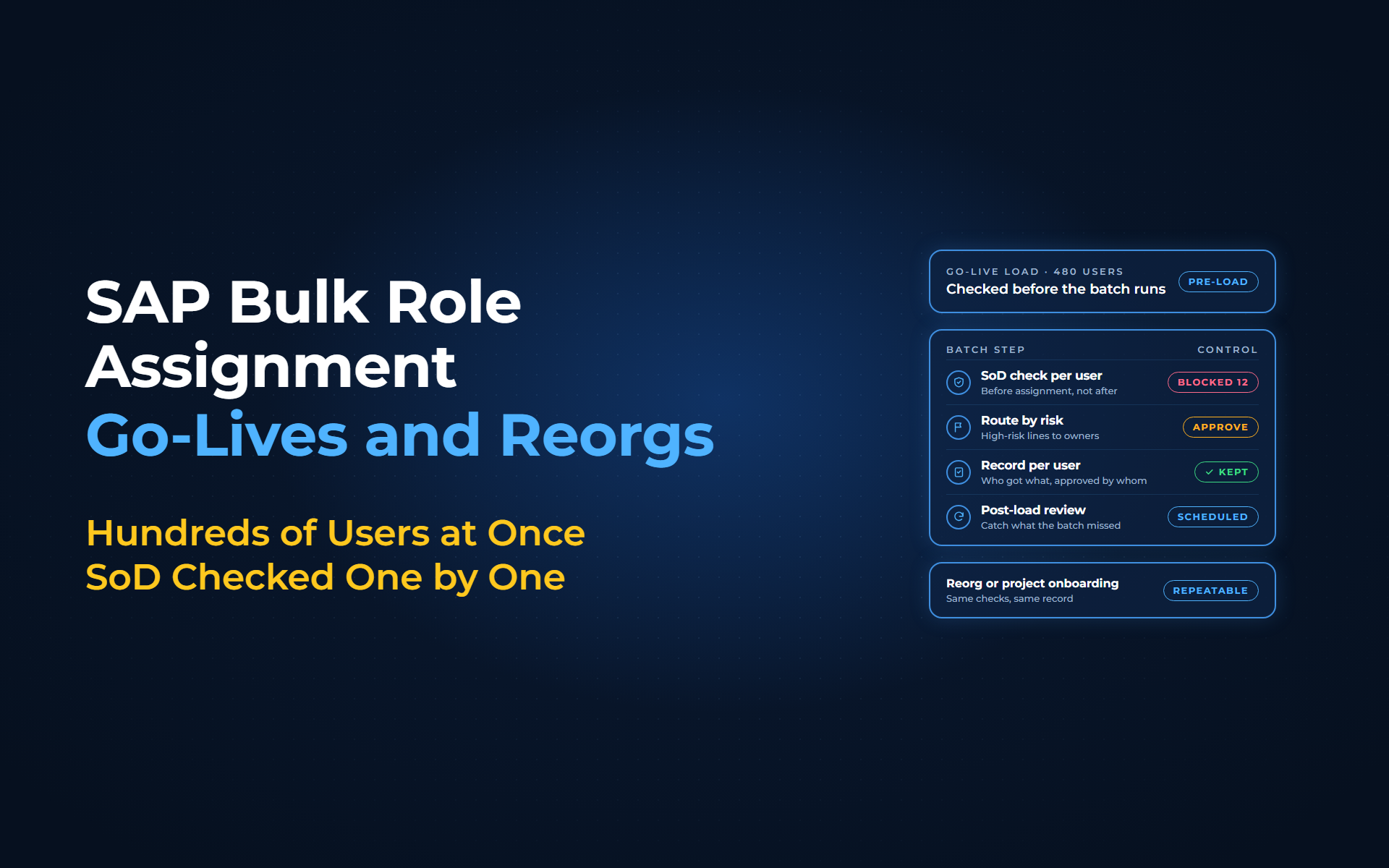
An SAP bulk role assignment is safe only when every user in the batch gets the checks a single request would: eligibility, segregation of duties (SoD) and an accountable approver, recorded per user. With Anugal, a go-live load, reorg or project onboarding runs as one governed event, with SoD checked before execution and evidence kept per person.
Saturday of the S/4HANA go-live weekend: the cutover team loads roles for several hundred users from a spreadsheet the sponsor signed off as a whole. Months later, the auditor samples user 312, a buyer who can also post vendor invoices, and asks who approved that access. The mass-change log shows which administrator ran the load and when. Nobody can show the approval.
How is an SAP bulk role assignment done today?
SAP gives administrators transaction SU10 for mass changes. SAP Help describes it as making most SU01 user changes, including roles, "for many users at once", and SAP KBA 3670057 explains how to perform mass role assignment for users. Large loads are often scripted. Either way, the tool records the change: after every mass change, SAP shows who made which changes, in which system and when. It does not record the decision behind each row.
A mass-change log tells you who ran the load. It does not tell you who approved user 312.
The Anugal mass and bulk access requests page names the pattern: "Large-scale access changes are common during go-lives, migrations, restructures and project onboarding. Yet bulk provisioning is often handled through scripts or urgent approvals that bypass policy checks." Here is where it breaks, phase by phase.
Before the bulk event: what should be checked?
- What usually goes wrong:
The source list is a free-form spreadsheet of user IDs and role names. SoD is planned for after go-live, or skipped, because nobody runs several hundred checks by hand during cutover. - With Anugal:
Anugal applies standardized access models instead of free-form lists. Eligibility and SoD checks are enforced before execution, and ineligible users are excluded automatically. The SoD engine starts from exactly this case, "access requests, role changes, or bulk assignments", and evaluates the requested access against enterprise-wide SoD rules. User 312's conflict is caught before the load, not in the audit sample.
During the bulk event: who approves which users?
- What usually goes wrong:
One blanket approval covers every row. Governance is bypassed to meet project timelines, and the load runs from a script or SU10 under an administrator with broad rights. A conflicting user goes in with everyone else. - With Anugal:
Approval paths adapt to access risk. Approval is routed to application and role owners, project-based access requires explicit sponsorship, and sensitive access triggers additional authorization layers. Conflicting access is blocked, escalated or routed for mitigation, with compensating controls given a defined owner and scope. Approved changes then run through governed workflows, and provisioning follows the validated SoD outcomes.
For more on why an approval alone is not a control, see Your SAP Access Request Was Approved. Was It Controlled?
After the bulk event: can you prove each user's access?
- What usually goes wrong:
The evidence is a spreadsheet, an email and a change log. Auditors cannot link bulk access to individual justification or approval. An SoD run after go-live finds conflicts users already hold, and temporary project access becomes permanent standing access. - With Anugal:
Anugal records who approved, what was granted and why, and maintains per-user access evidence within bulk events, so audit review needs no manual reconstruction. The answer for user 312 is a record, not a search. Project access granted in the event can carry an end date, so it does not outlive hypercare.
With Anugal, an SAP bulk role assignment runs as one governed event: every user in the batch is checked for eligibility and SoD before execution, approved along a path that adapts to access risk, and kept as a per-user record.
Manual bulk loads vs bulk events with Anugal
| Step | Manual bulk load | With Anugal |
|---|---|---|
| User list | Free-form spreadsheet | Standardized access models |
| SoD check | After go-live, or skipped | Before execution, per user |
| Approval | One sign-off for the batch | Routed to application and role owners by access risk |
| Conflicts | Loaded with everyone else | Blocked, escalated or mitigated with a named owner |
| Execution | Script or SU10 run by an administrator | Governed workflow that follows the SoD outcome |
| Evidence | Change log plus email | Who approved, what was granted and why, per user |
What does your team still own?
Two things stay with you. The source list: which users need which roles on day one. And the cutover plan: sequencing, freeze windows, fallback and weekend sign-off. Anugal checks against the SoD rules you configure, so your security and audit teams also keep the rule set and every risk acceptance. For why that rule set belongs in the design stage, see Segregation of Duties by Design, Not by Detection. For a small, low-risk change, SU10 with a documented approval may be enough.
Plan your next bulk event
From one blanket sign-off to a record for every user
Go-lives, reorgs and project onboarding will keep arriving in batches. The audit question will still be about one person. To see a bulk role assignment checked, approved and recorded user by user, let's get you a working demo, or write to info.anugal@businesscoresolutions.com.
SAP bulk role assignment: common questions
Can SU10 assign roles to many SAP users at once?
Yes. SAP's mass change transaction SU10 applies most SU01 user changes, including roles, to many users at once. After every mass change, SAP shows who made which changes, in which system and when.
Should SoD checks run before or after an SAP bulk role assignment?
Before. A check after the load finds conflicts users already hold. Checking every user before execution lets you exclude, escalate or mitigate a conflict before anyone receives the access.
What evidence should an SAP bulk role assignment leave for auditors?
A record for each user: what was granted, who approved it and why, and the SoD outcome. One sign-off on a spreadsheet does not link bulk access to individual justification or approval.
Does Anugal replace the cutover plan for a go-live?
No. Your team still owns the source list of users and roles and the cutover plan. Anugal checks eligibility and SoD, routes approvals by access risk and keeps per-user evidence within the bulk event.
Sources
- SAP Help (SAP Enterprise Management 9.2, older release): User Maintenance: Mass Changes (https://help.sap.com/doc/saphelp_em92/9.2/en-US/2e/6d9704db7811d2961c0000e82de14a/content.htm). Transaction SU10 makes most SU01 changes, including roles, for many users at once, and shows who made which changes in which system at what time.
- SAP Help (SAP NetWeaver 7.4): User and Role Administration of AS ABAP (https://help.sap.com/doc/saphelp_nw74/7.4.16/en-us/47/fe89a62d204aa7e10000000a421937/content.htm). SU01 and SU10 as the user maintenance transactions; mass changes of user data as a task.
- SAP KBA 3670057: How to perform mass role assignment for users (https://userapps.support.sap.com/sap/support/knowledge/en/3670057). Applies to SAP S/4HANA, SAP NetWeaver and ABAP platform, all versions.
- Anugal: Mass and Bulk Access Requests (https://anugal.ai/mass-bulk-access-requests/). Bulk changes at go-lives, migrations, restructures and project onboarding; standardized access models; eligibility and SoD checks before execution; risk-adapted approval paths; per-user evidence within bulk events.
- Anugal: Segregation of Duties (SoD) Engine (https://anugal.ai/segregation-of-duties-sod-engine/). Bulk assignments as an SoD trigger; evaluation against enterprise-wide SoD rules; block, escalate or mitigate; governed execution that follows validated SoD outcomes.
- Anugal: Your SAP Access Request Was Approved. Was It Controlled? (https://anugal.ai/sap-access-request-approval-controls/). Related post.
- Anugal: Segregation of Duties by Design, Not by Detection (https://anugal.ai/segregation-of-duties-by-design/). Related post.