

SAP access risk · 4 min read
Before You Add a Transaction to an SAP Role, Check Who Else Inherits the Conflict
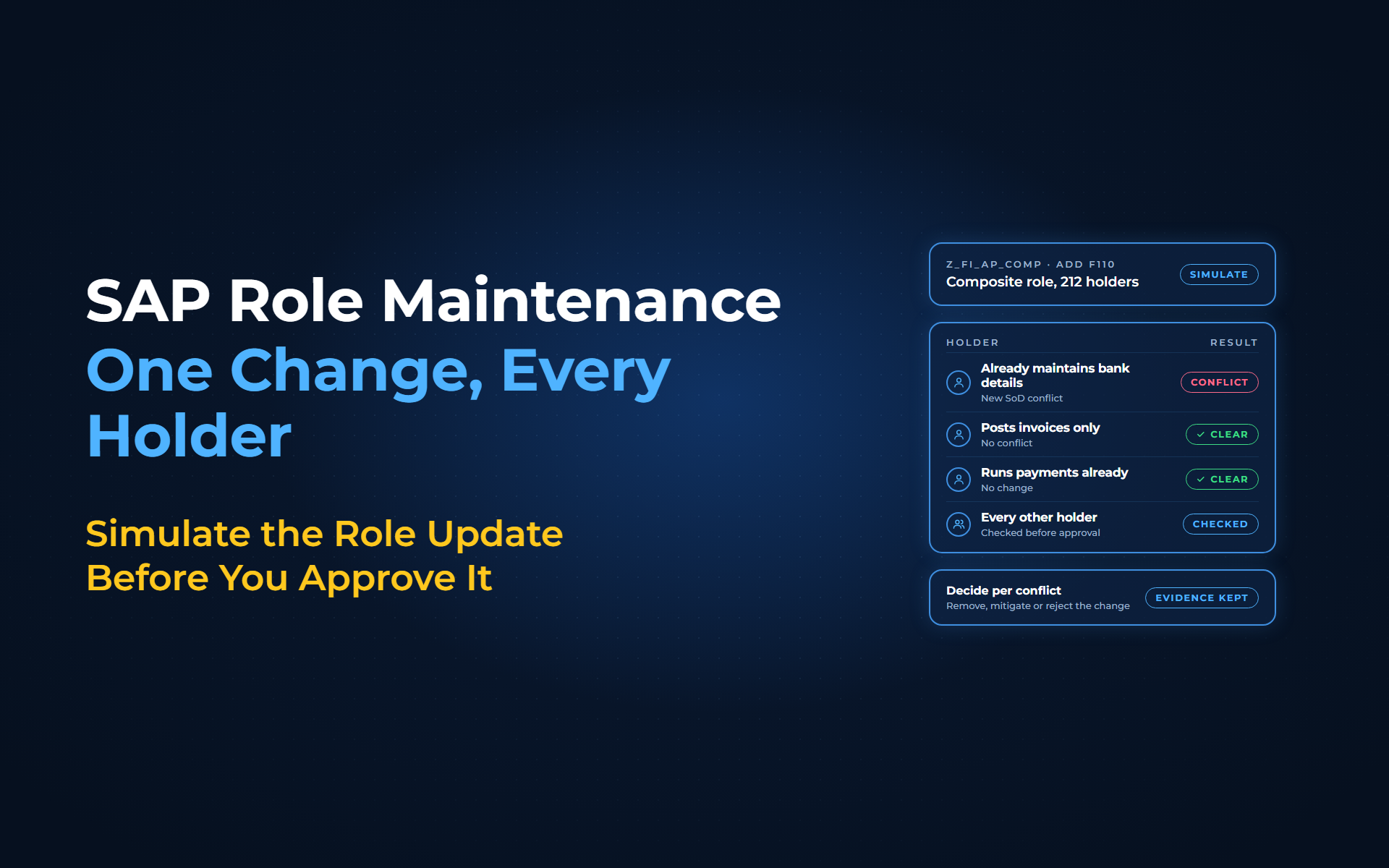
SAP role maintenance SoD is the segregation of duties check that runs when the content of a live role changes, not when a user asks for access. Add 1 transaction to a composite role and every holder gets it at once, including people who already hold the other half of a conflict. With Anugal, the change is simulated against your SoD ruleset for every current holder before anyone approves it.
From next month the accounts payable team will run supplier payments itself, so the finance process owner asks for F110, SAP's automatic payment program, to be added to the composite role for AP processing. 140 users hold that role. The change passes its functional test in QA. Nobody on the ticket knows that 12 of those 140 can also maintain supplier bank details, and the payment program pays to the bank details held in the supplier master. Once the role is imported and users are compared, those 12 people can change where a supplier's money goes and then send it.
Why can't the role owner see who inherits the conflict?
Because role maintenance shows the role, while the conflict sits in the other roles its holders already have. 5 things hide it:
- The holders are out of view:
In PFCG, the role owner sees the users assigned to the composite role, not what else each of them holds. - The change travels further than 1 role:
Users of a composite role receive its single roles during the user comparison. If the transaction goes into a role that others are derived from, SAP copies it into every derived role too. - The ruleset lives somewhere else:
The SoD rules sit with the GRC team, in another tool or a spreadsheet, out of the change approver's sight. - The transport sets the timing:
After import, a user master comparison updates the holders, so all 140 get the change together. - Nothing is kept:
A check, if anyone runs one, ends up in an email thread. The auditor sees only the transport.
Checks while a role is built (segregation of duties by design) and on 1 user's request (SAP access request controls) are other moments. This one concerns a live role.
How does Anugal handle SAP role maintenance SoD before approval?
With Anugal, the same change request goes through 5 steps:
- Capture the change:
The request names the role, the transaction to add and the reason. Anugal identifies the target system, role and entitlements, and captures business function and scope as context. - Simulate it against every current holder:
Anugal simulates the updated role against your SoD ruleset for all 140 users who hold it today. Conflicts are assessed across applications, roles and business functions, and risk severity is set in real time. The result is a list: 12 holders, 1 risk, its severity. Composite roles that contain the changed single role, and roles derived from it, are covered by the same simulation. - Decide:
The role owner and the risk owner pick 1 of 4 outcomes. Adjust the change, for example by placing F110 in a separate single role for payment staff only. Split the composite role. Mitigate, with a compensating control that has a named owner, a scope and an expiry. Or accept it with a written justification. - Approve:
Access requests and role changes are evaluated against SoD policies prior to approval, so nobody signs off on F110 without the 12 names in view. Your team then transports the role through its usual release path. - Keep the simulation as evidence:
The simulation, the decision, any mitigation and the approval are kept as structured audit records that link the change to its SoD evaluation. When the auditor asks why 12 people could run payments, the answer is 1 record, not an email search.
With Anugal, a change to an SAP role is simulated against the SoD ruleset for every user who already holds that role, and the result is kept as audit evidence before the change is approved.
What changes compared with checking by hand?
The difference is who gets checked and what is left behind:
| Step | Manual | With Anugal |
|---|---|---|
| Who is affected | The role's user list in PFCG | Every current holder, simulated against the ruleset |
| Ruleset | Held by another team, used if someone asks | Applied to the change before approval |
| Decision | Approve or reject the ticket | Adjust, split, mitigate with a named owner, or accept |
| Evidence | The transport request and an email thread | A structured audit record linking the change to its SoD evaluation |
You still own the ruleset, the risk decision and the transport. A simulation is only as good as the rules you configure, and for a role with a handful of holders and no sensitive transactions, a manual check may be enough. If SAP GRC Access Control stays, Anugal can co-exist with it. Anugal is an identity governance option, not a replacement for every SAP GRC function.
See a role update simulated
From 1 added transaction to a decision you can show
The finance team still gets its payment run. With SAP role maintenance SoD checked before approval, the 12 people who also maintain bank details become a named decision on file, not a surprise in an audit sample. To see a role update simulated, let's get you a working demo, or write to info.anugal@businesscoresolutions.com.
SAP role maintenance SoD: common questions
Are there role design tools that can prevent segregation of duties conflicts?
Yes, at 2 moments. While a role is being built, design-time checks keep conflicting duties apart. Once a role is live, the check moves to role maintenance: simulate each proposed change against every current holder before it is approved.
What does SoD enforcement mean for SAP role maintenance?
It means a proposed change to a live role's content is evaluated against the SoD ruleset for the users who hold that role, before approval. The outcome is a recorded decision: adjust, split, mitigate with a named owner, or accept.
Does a change to 1 single role reach composite and derived roles?
Yes. Users assigned a composite role receive its single roles during the user comparison, and transactions added to the menu of an original role are copied into the roles derived from it. 1 edit can reach users who never asked for it.
Sources
- SAP Help (NetWeaver, older release): Creating Composite Roles (https://help.sap.com/saphelp_nwes72/helpdata/en/42/271d24d86211d2961a0000e82de14a/content.htm). Composite roles consist of single roles; users assigned a composite role receive the single roles during the compare; users are maintained on the Users tab of PFCG.
- SAP Help (NetWeaver 7.3): Derive Roles (https://help.sap.com/doc/saphelp_nw73/7.3.16/en-US/1c/c38028816c11d396bc0000e82de14a/content.htm). Transaction codes added to the menu of the original role are copied into the derived role; authorization data is copied to derived roles.
- SAP Help (NetWeaver, older release): Transporting Roles (https://help.sap.com/saphelp_nwes72/helpdata/en/6d/7c8cfd410ea040aadf92e1f78107a4/content.htm). Roles are transported from PFCG in a Customizing request; a user master comparison is performed in the target system.
- SAP KBA 3761846: Special G/L down payments not considered in F110 selection (https://userapps.support.sap.com/sap/support/knowledge/en/3761846). F110 is the SAP automatic payment program, SAP R/3 and SAP S/4HANA.
- SAP KBA 1588392: Payment program uses head office bank details (https://userapps.support.sap.com/sap/support/knowledge/en/1588392). The payment program takes the information it needs, including bank details, from the supplier master record.
- SAP KBA 3358090: IBAN blank in F110 payment file (https://userapps.support.sap.com/sap/support/knowledge/en/3358090). Bank details such as the IBAN are maintained in vendor master data and used by F110.
- Anugal: Enforce Segregation of Duties (SoD) (https://anugal.ai/enforce-segregation-of-duties-sod/). Access requests and role changes evaluated against SoD policies prior to approval; time-bound, traceable mitigations; structured audit records.
- Anugal: Segregation of Duties (SoD) Engine (https://anugal.ai/segregation-of-duties-sod-engine/). Role changes initiated and identified with context; conflicts assessed across applications, roles and business functions; severity in real time; compensating controls with ownership, scope and expiry; evidence linking access changes to SoD evaluation.
- Anugal: FAQs (https://anugal.ai/faqs/). Co-existence with current tools such as SAP GRC; starting with use cases such as SoD risk governance.